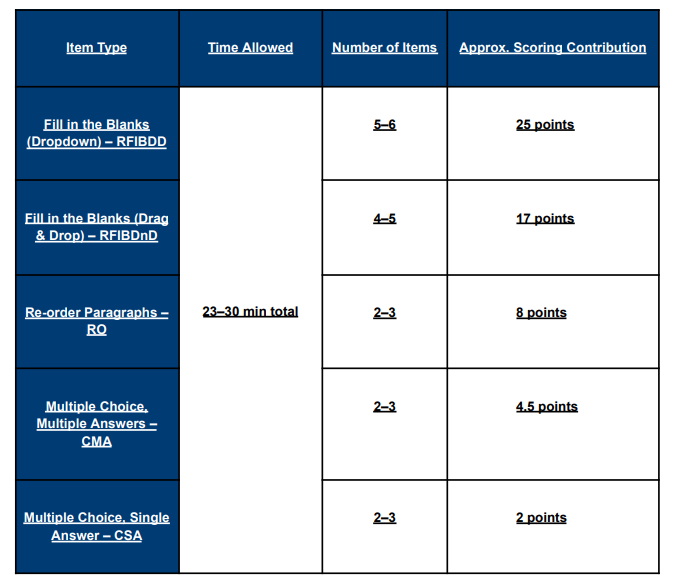
Reading item types require you to understand authentic academic texts sourced from real university-style materials. These passages may cover topics from the humanities, natural sciences, or social sciences, and you do not need prior knowledge of the subject. All the information needed to answer the questions is contained within the text itself. The Reading section is not timed per question; instead, you manage your time across the entire set of items.
For this item type you need to read the passage and answer the multiple-choice question
There are several possible response options but only one is correct.
To select an option click on it using the left button on your mouse. If you change your mind, left-click on the option again to deselect it, or left-click on a different option.
The option you select is highlighted.
For this item type you need to read the passage and answer the multiple-choice question. There is more than one correct response.
You need to select all the response options that you think are correct from the list of possible options.
To select an option click on it using the left button on your mouse. If you change your mind, left-click on the option again to deselect it.
The options you select are highlighted.
For this item type, you need to restore the original order of the text by selecting text boxes and dragging them across the screen.
There are two ways you can move the text:
To deselect a box, left-click elsewhere on the screen.
For this item type you need to drag and drop words across the screen to correctly fill in the gaps in the text.
There is a passage with some missing words. You have a list of words in the blue box that you can use to fill the gaps in the text. There are more words than gaps so you will not use all the words provided.
Left-click on a word to select it; keep the left mouse button held down and drag the word to the gap where you want to place it. You can also drag words between gaps. To remove a word from a gap, drag it back to the blue box.
For this item type, you need to select the most appropriate words from a drop-down list to restore the text.
There is a passage with some missing words. Beside each gap, there is a button with a drop-down list. Left-click on this button to reveal the drop-down list of options for that gap. Select the option you think best fills the gap.
To change your mind, left-click on a different option.
With a 99% success rate, we are dedicated to helping you excel in the PTE Academic exam and achieve your best score on your first attempt.
Get instant replies
+61 481 332 072
Fill out form and we'll get back to you
Copyright © 2025 IPT Brisbane. All rights reserved.
